Overview:
The Method column in the Cost Projections grid will change how your users enter in their Cost Projections. This is primarily used for customers that do Unit based projections.
Notice the ‘Recalculate’ button in top right which will recalculate all of the values based on the type of Method selected on each row.
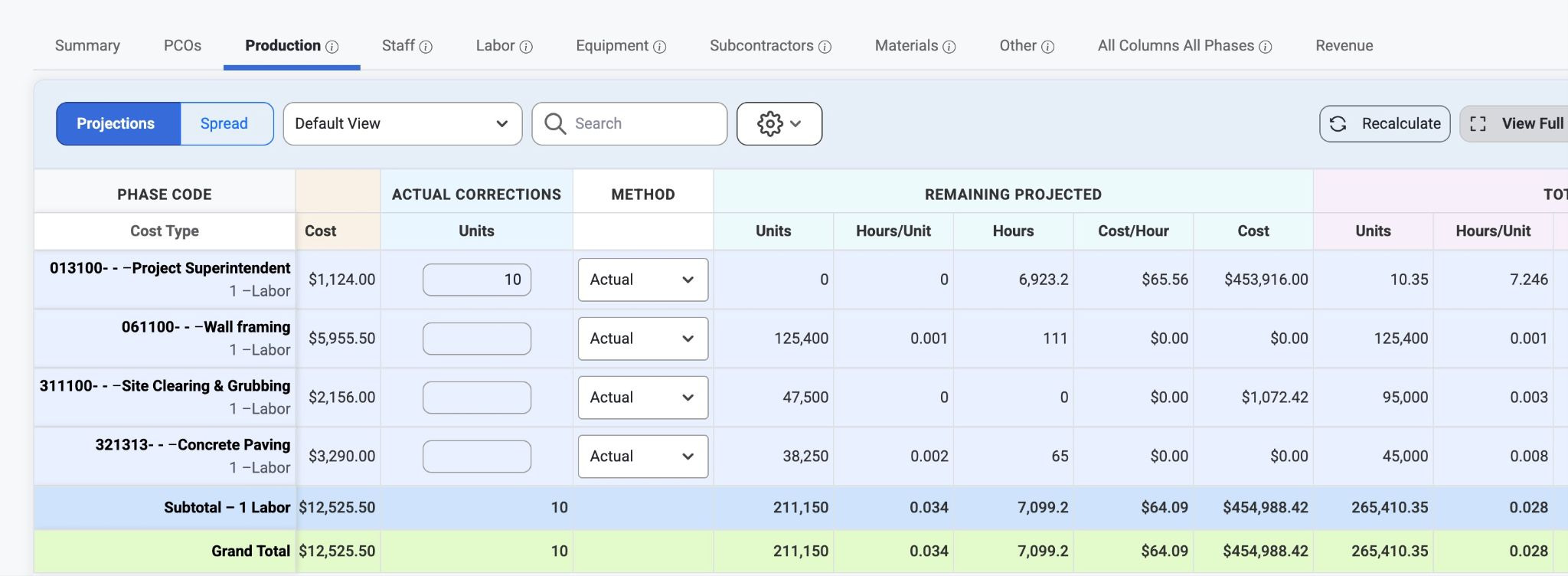
When Method is shown, it will limit the entry of data into the Remaining Projected columns and the Total Projected columns. This field will also default based each budget code's % Units Complete:
Budget will be default if less than 10%
Actual will default if 10% or more
Override will only default if the previous months projection was set to override
What the Method selection changes:
Budget
With this selection, the Remaining Projected Hours/Unit and Remaining Projected Cost/Hour values will be based on these values from the Current Estimate.
Actual
With this selection, the Remaining Projected Hours/Unit and Remaining Projected Cost/Hour values will be based on these values from the Actuals To Date.
Override
With this selection, the Remaining Projected Hours/Unit and Remaining Projected Cost/Hour values will be editable so the user can plug in any amounts they want.
Was this article helpful?
That’s Great!
Thank you for your feedback
Sorry! We couldn't be helpful
Thank you for your feedback
Feedback sent
We appreciate your effort and will try to fix the article