Within the Global Cost projections grid there is a Method Column with 3 different viewing options: Budget, Actual, and Override. The users view of values differentiates based on which method option is selected.
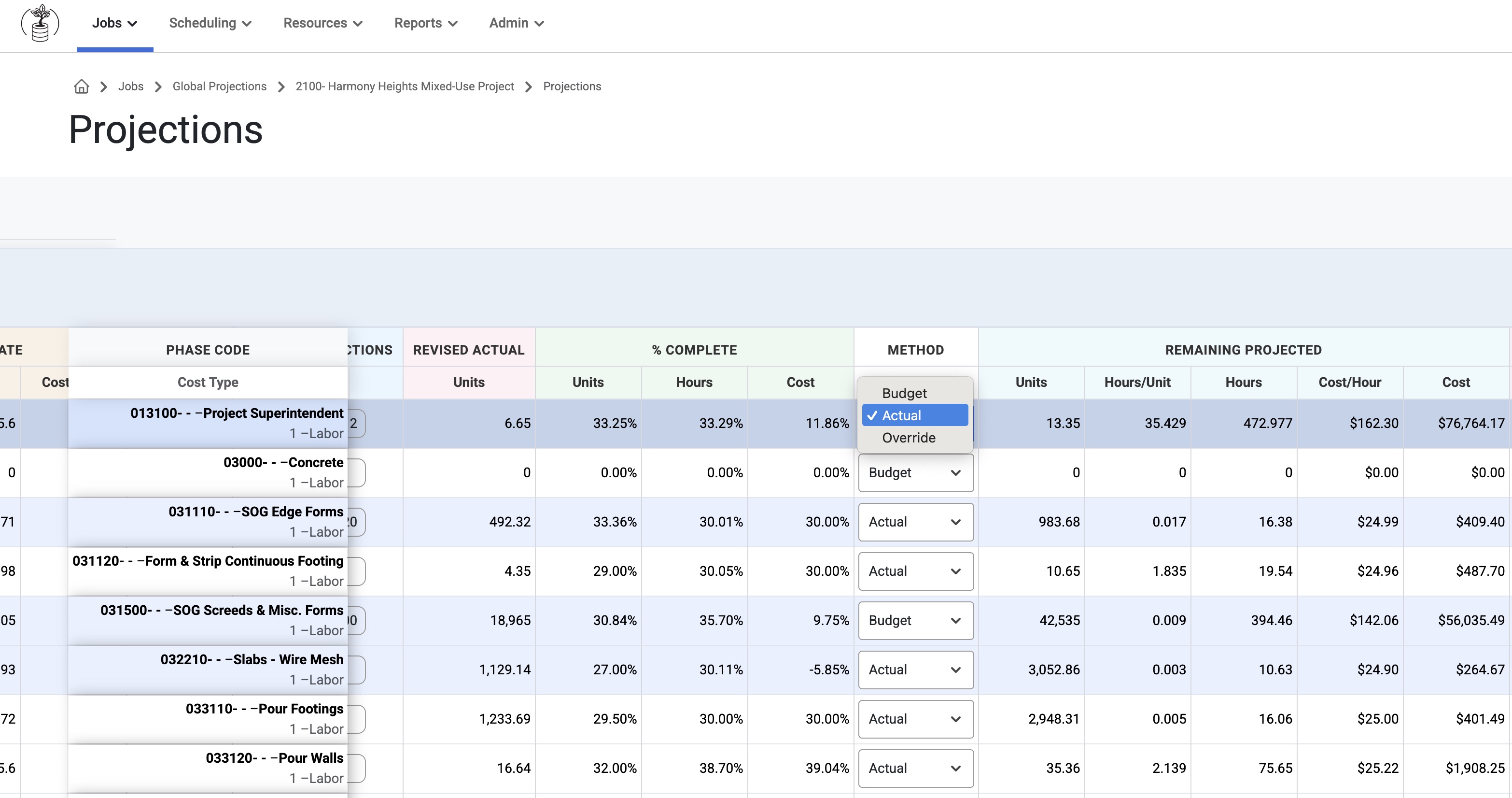
Method Column
If this column is enabled for the tab, the Remaining Projected columns and the Total Projected columns will be read only. Changing the Method drop-down will then update the values in the Remaining Projected section.
When Method column is not enabled for the tab, the Remaining Projected Columns read differently:
- Remaining Projected Units = (Current Estimated Units + Budget Correction Units) - (Actual To Date Units + Actual Unit Corrections)
- Remaining Projected Hours = (Current Estimated Hours + Budget Correction Hours) - (Actual To Date Hours)
- Remaining Projected Costs = (Current Estimated Costs + Budget Correction Costs) - (Actual To Date Costs)
- Remaining Projected Hours/Unit = Remaining Projected Hours / Remaining Projected Units
- Remaining Projected Cost/Hour = Remaining Projected Cost / Remaining Projected Hours
- These two ratios are based on the calculated remaining values and not pulled from budgeted or actuals
Budget
If this is selected, the Remaining Projected Hours/Unit and Remaining Projected Cost/Hour will update to the the Budget (Current Estimate) numbers. This will also update the following columns:
Remaining Projected Hours = Remaining Projected Units X Current Estimate Hours/Unit
Remaining Projected Cost = new Remaining Projected Hours x Current Estimate Cost/Hour
Total Projected Hours = Current Estimate Hours + new Remaining Hours
Total Projected Cost = Current Estimate Cost + new Remaining Projected Cost
Total Projected Hours/Unit = Total Projected Hours / Total Projected Units
Total Projected Cost/Hour = Total Projected Cost / Total Projected Hours
Actual
If this is selected, the Remaining Projected Hours/Unit and Remaining Projected Cost/Hour will update to the Actual To Date numbers. This will also update the following columns:
Remaining Projected Hours = Remaining Projected Units X Actual To Date Hours/Unit
Remaining Projected Cost = new Remaining Projected Hours x Actual To Date Cost/Hour
Total Projected Hours = Current Estimate Hours + new Remaining Hours
Total Projected Cost = Current Estimate Cost + new Remaining Projected Cost
Total Projected Hours/Unit = Total Projected Hours / Total Projected Units
Total Projected Cost/Hour = Total Projected Cost / Total Projected Hours
Override
If this is selected, the user can make manual edits to the Remaining Projected Hours/Unit and Remaining Projected Cost/Hour. If the user adds a manual override, it will also update the following columns:
Remaining Projected Hours = Remaining Projected Units X new Remaining Hours/Unit
Remaining Projected Cost = new Remaining Projected Hours x new Remaining Cost/Hour
Total Projected Hours = Current Estimate Hours + new Remaining Hours
Total Projected Cost = Current Estimate Cost + new Remaining Cost
Total Projected Hours/Unit = Total Projected Hours / Total Projected Units
Total Projected Cost/Hour = Total Projected Cost / Total Projected Hours
Was this article helpful?
That’s Great!
Thank you for your feedback
Sorry! We couldn't be helpful
Thank you for your feedback
Feedback sent
We appreciate your effort and will try to fix the article