Global Cash Flow
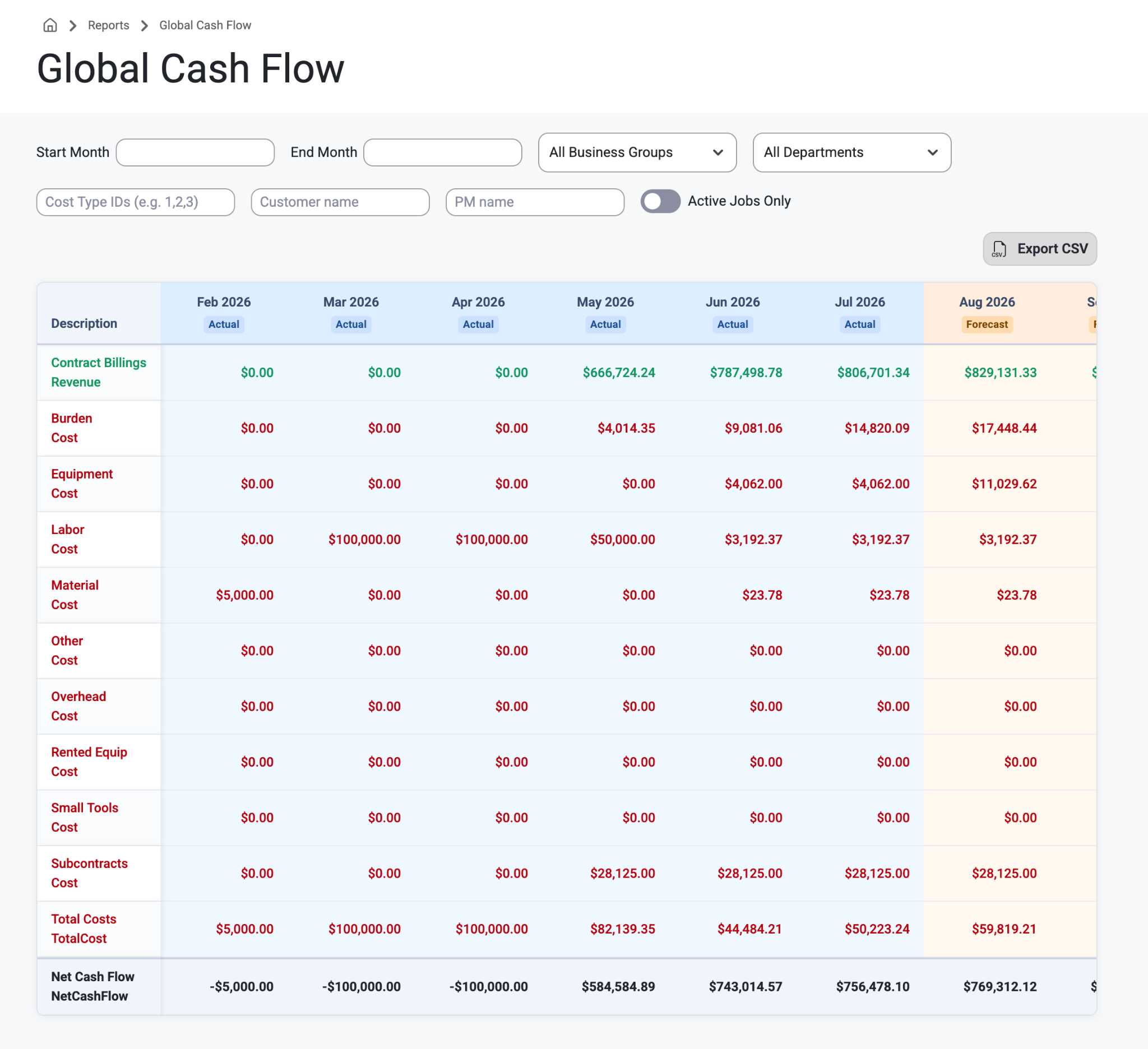
Reports now has a new page called ‘Global Cash Flow.’ This page shows admin users all of the Cash Flow for all projects grouped together.
Type in Start or End month and select a Business Group and Department from the filters. Users can also Enable ‘Active Jobs Only’ search by Cost Type ID, Customer Name, or PM Name. Once a selection has been made, users export the results via the ‘Export CSV’ button.
What Users See:
Descriptions of Cash Flow and their Actual/Forecasted amounts by the month.
Examples:
Contract Billings Revenue
Burden Cost
Equipment Cost
Labor Cost
Material Cost
Other Cost
Overhead Cost
Rented Equipment Cost
Small Tools Cost
Subcontracts Cost
Total Costs
Net Cash Flow
This allows PMs and other managing personnel to see a rollup of cash flow and keep track of all the costs that come with jobs and projects, and where adjustments might need to be made for productivity and profit.
Was this article helpful?
That’s Great!
Thank you for your feedback
Sorry! We couldn't be helpful
Thank you for your feedback
Feedback sent
We appreciate your effort and will try to fix the article