Work In Progress
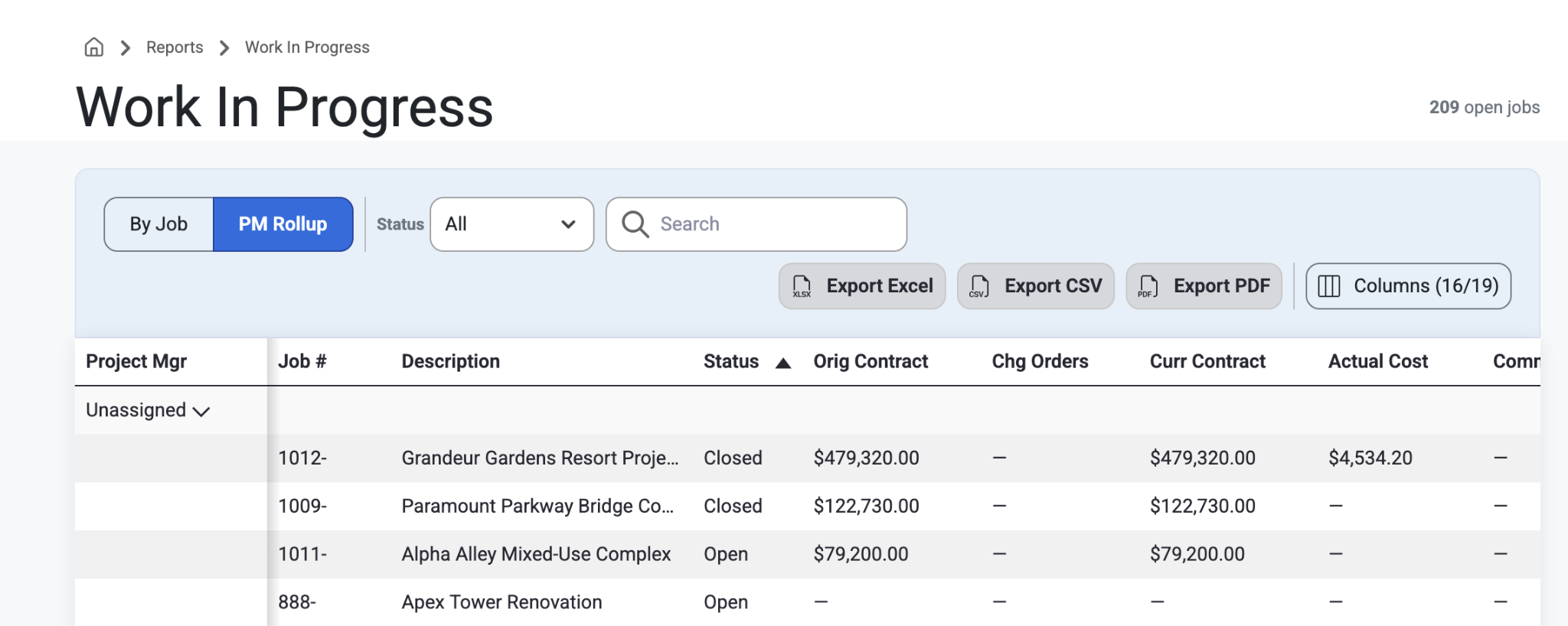
This page allows users to see different jobs and their statuses over time as well as who the PMs are, and what the costs are or how they have changed over time. Users can Search and Filter by Status, By Job, or By PM Rollup. Once the selection has been made, the grid list can be shared or exported via the export buttons at the top of the grid list (Excel, CSV, PDF).
Header columns can also be adjusted and expanded.
Here is a list of the column headers users can expect to see:
Job #
Description
Project Manager
Status
Original Contract
CHnage Orders
Current Contract
Actual Cost
Committed
EAC Cost
% Completed
Earned to Date
To Date Billing
Over/Under
Gross Profit
Margin %
Grand Totals will be listed on the bottom row in a black highlighted bar. The values in each column will appear green if they are Overbilled or positive (favorable) and red if they are Under-billed or negative (earned revenue not yet collected).
If a user selects the ‘PM Rollup’ button, the same information above will be shown but instead will be organized by Project Manager instead of by Job. Users can select the arrow icon to expand a PM’s job.
Was this article helpful?
That’s Great!
Thank you for your feedback
Sorry! We couldn't be helpful
Thank you for your feedback
Feedback sent
We appreciate your effort and will try to fix the article