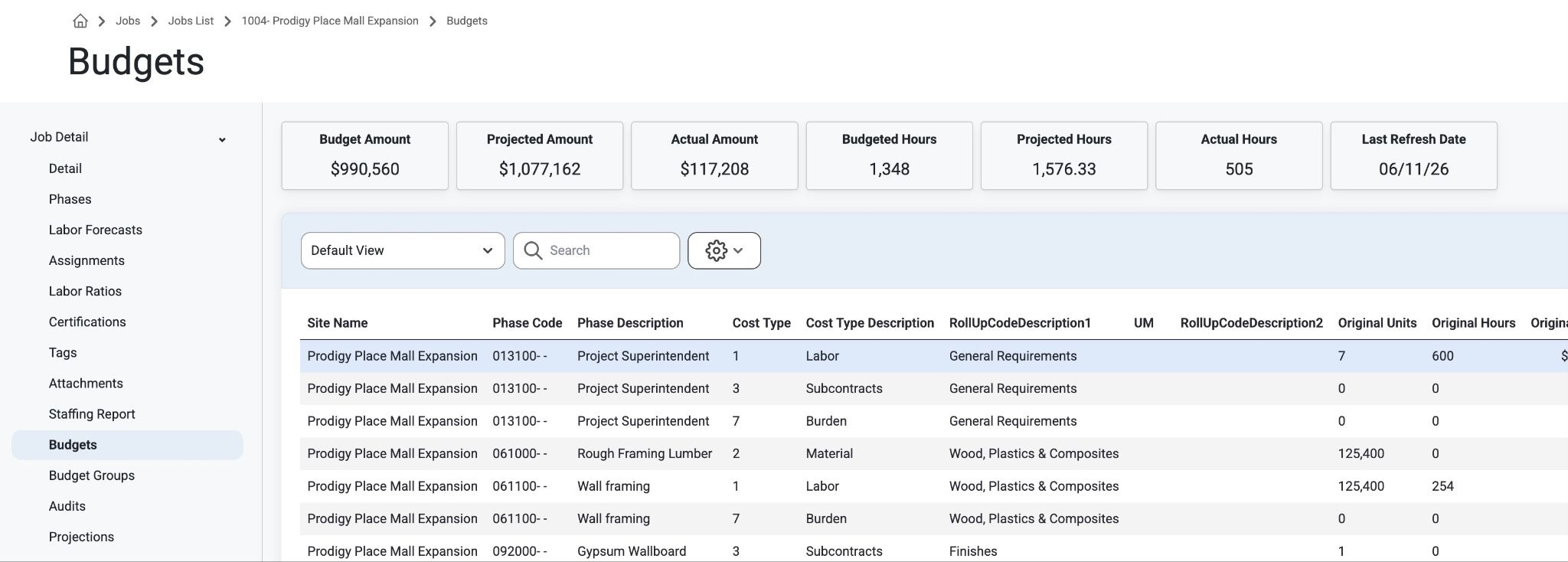
This is the Job Budget information; only users with ‘Can View Sensitive’ permissions for Jobs will see this page. Read about setting up Permission Groups, here: Permissions
To view a Budget go to the Job List page.
Click on a job from the Jobs List and Navigate to ‘Budgets.’
Admin Users can view Budget Amounts, Projected Amounts, Actual Amounts, Budgeted Hours, Projected Hours, Actual Hours, Totals, and Last Refresh Date.
Was this article helpful?
That’s Great!
Thank you for your feedback
Sorry! We couldn't be helpful
Thank you for your feedback
Feedback sent
We appreciate your effort and will try to fix the article